About ACDSee Camera Pro
ACDSee Camera Pro lets you harness the full power of your device's camera. RAW Support Shoot RAW on capable devices and write captured photos in DNG format. Lossless TIFF/PNG Write captured photos in lossless TIFF or PNG...
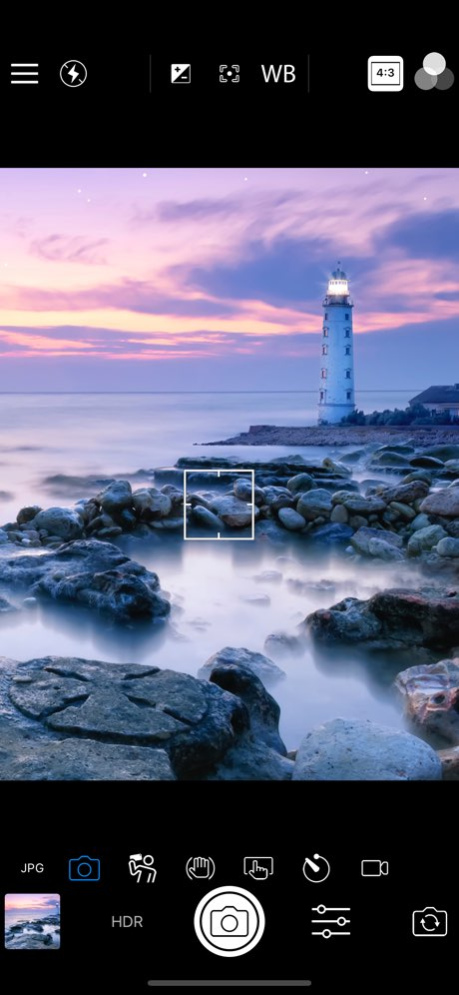
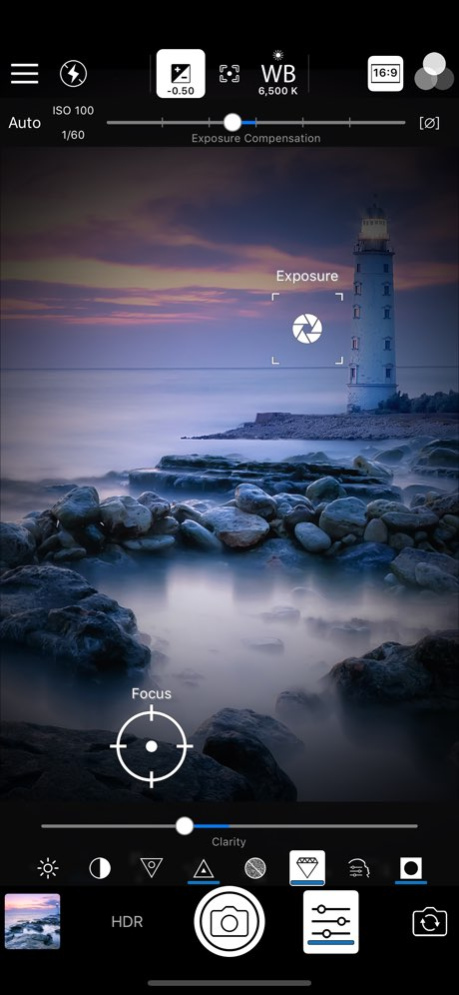
ACDSee Camera Pro lets you harness the full power of your device's camera. RAW Support Shoot RAW on capable devices and write captured photos in DNG format. Lossless TIFF/PNG Write captured photos in lossless TIFF or PNG format, or choose one of three JPEG quality settings. Manual Controls Precisely control exposure, focus and white balance, including a custom white balance preset. Real-time overexposure and underexposure visualization. Shutter Priority Mode Set the shutter speed and ACDSee Camera Pro automatically chooses the ISO for proper exposure. Selfie Mode Look your best with skin smoothing and lightening, plus a front-facing torch/flash for low-light situations. Real-time Effect Filters Choose from 24 effects, including high-quality black & white, Orton, film grain, halftone, and various color tone filters. Real-time Adjustments See brightness, contrast, vibrance, sharpness, clarity, skin tune and vignette adjustments in real time and add additional noise reduction during capture. Exposure Bracketing Capture three exposures at once at different exposure levels. HDR Fusion Combine three shots taken at different exposures to create a single high-dynamic-range image, with manual override of composition parameters. Flash Fusion Combine a naturally-illuminated capture with a flash-illuminated capture. Video Mode Capture those special moments with video and apply filters and adjustments in real-time. Flash Modes Choose from six flash modes: Off, On, Auto, Torch, Torch & flash, and Flash Fusion. All modes work with either the rear-facing or the front-facing camera. Touch Focus and Exposure Touch to select focus and exposure point. For more precise control, independently select focus and exposure points. Lockable AF, AE and AWB Independently lock focus, exposure, and white balance. Cropping modes Crop before you shoot to square, 4:3, 3:2, and 16:9 aspect ratios. Independent settings for front and rear cameras, still photo and video modes. Level Indicator Compose your shots with precise alignment using a dual-axis level indicator. ACDSee is a trademark of ACD Systems International Inc. and may be registered in Canada, the United States, the European Union, Japan, or certain other jurisdictions.
Version History Performance improvements and bug fixes. 2.0.8 Jun 4 Performance improvements and bug fixes 2.0.7 03/13/2020 Performance improvements and bug fixes 2.0.6 07/24/2019 Performance improvements and bug fixes 2.0.5 12/03/2018 Performance improvements and bug fixes 2.0.4 09/12/2018 Performance improvements and bug fixes 2.0.3 05/28/2018 Fixed crash capturing photo with shutter priority mode on some devices Other performance improvements and bug fixes 2.0.2 04/24/2018 Fixed incorrectly identified camera model in Exif on some iPhone X devices Changed default value of "Reset Camera Settings when App is Restarted" from ON to OFF 2.0.1 01/31/2018 Photos can now be captured using the new HEIC format on supported hardware. The settings UI has been redesigned and additional settings are available. Raw capture can now be configured to produce DNG, DNG+JPEG or separate DNG and processed assets. Captures with adjustments can now be output as original / edited assets, allowing the adjustments to be modified later, or the adjusted image can be output to a separate asset from the unadjusted photo. The drawer button can be long pressed to go directly to the camera settings. The output format indicator can be tapped to go directly to the photo capture settings. Updated UI for iPhone X. Bug fixes, stability and performance enhancements have been applied. 2.0 01/18/2018 Performance improvements and bug fixes 1.1.10 08/22/2017 Fixed "Enable volume button shutter" muting audio in captured video. 1.1.9 07/31/2017 Fixed an issue with "Enable volume button shutter". 1.1.8 07/18/2017 Resolved an issue where the app sometimes automatically captured a photo / video immediately after startup. 1.1.7 07/09/2017 Fixed non-HDR/Flash bracketing exposures not saved until "Save individual HDR / Flash Bracketing exposures" setting is enabled 1.1.6 07/03/2017 Performance improvements and bug fixes 1.1.5 05/26/2017 Added Video Stabilization setting Fixed Flash Fusion mode not saving correctly on some devices Fixed image filename sequence numbers being skipped when capturing RAW Recovery of captured video that could not be written to the device’s photo library Performance improvements and bug fixes 1.1.4 01/03/2017 Performance improvements and bug fixes 1.1.3 10/18/2016 Performance improvements and bug fixes 1.1.2 10/15/2016 Performance improvements and bug fixes 1.1.1 10/12/2016 Added support for iPhone 7 Plus Dual Cameras Reduced lag between exposures in Flash Bracketing mode Performance improvements and bug fixes 1.1.0 10/07/2016 Performance improvements and bug fixes 1.0.2 09/27/2016 Performance improvements and bug fixes 1.0.1 09/21/2016 1.0.0 09/16/2016
Previous Versions
Here you can find the changelog of ACDSee Camera Pro since it was posted on our website on 2016-09-24 16:25:37.
The latest version is 2.0.8 and it was updated on 2026-10-13 21:04:14. See below the changes in each version.
ACDSee Camera Pro version 2.0.8
Updated At: 2026-10-13
Changes: Version History Performance improvements and bug fixes. 2.0.8 Jun 4 Performance improvements and bug fixes 2.0.7 03/13/2020 Performance improvements and bug fixes 2.0.6 07/24/2019 Performance improvements and bug fixes 2.0.5 12/03/2018 Performance improvements and bug fixes 2.0.4 09/12/2018 Performance improvements and bug fixes 2.0.3 05/28/2018 Fixed crash capturing photo with shutter priority mode on some devices
Other performance improvements and bug fixes 2.0.2 04/24/2018 Fixed incorrectly identified camera model in Exif on some iPhone X devices
Changed default value of "Reset Camera Settings when App is Restarted" from ON to OFF 2.0.1 01/31/2018 Photos can now be captured using the new HEIC format on supported hardware.
The settings UI has been redesigned and additional settings are available.
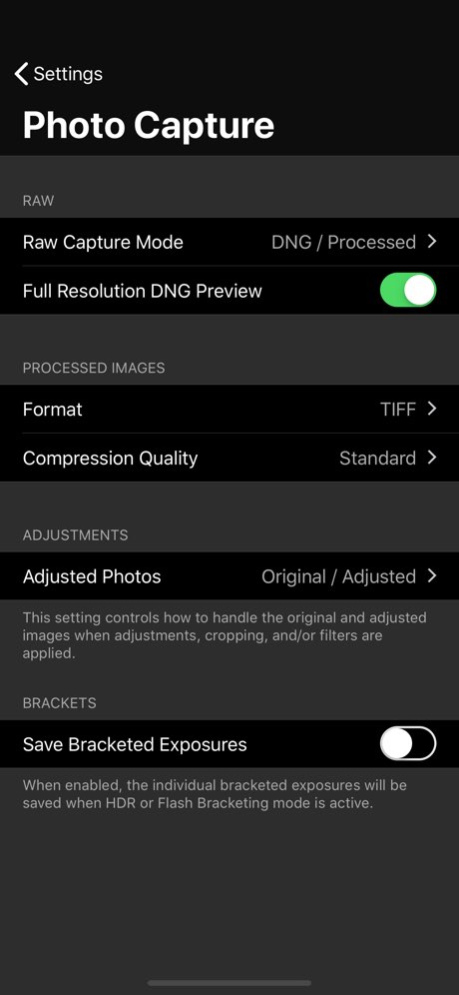
Raw capture can now be configured to produce DNG, DNG+JPEG or separate DNG and processed assets.
Captures with adjustments can now be output as original / edited assets, allowing the adjustments to be modified later, or the adjusted image can be output to a separate asset from the unadjusted photo.
The drawer button can be long pressed to go directly to the camera settings.
The output format indicator can be tapped to go directly to the photo capture settings.
Updated UI for iPhone X.
Bug fixes, stability and performance enhancements have been applied. 2.0 01/18/2018 Performance improvements and bug fixes 1.1.10 08/22/2017 Fixed "Enable volume button shutter" muting audio in captured video. 1.1.9 07/31/2017 Fixed an issue with "Enable volume button shutter". 1.1.8 07/18/2017 Resolved an issue where the app sometimes automatically captured a photo / video immediately after startup. 1.1.7 07/09/2017 Fixed non-HDR/Flash bracketing exposures not saved until "Save individual HDR / Flash Bracketing exposures" setting is enabled 1.1.6 07/03/2017 Performance improvements and bug fixes 1.1.5 05/26/2017 Added Video Stabilization setting
Fixed Flash Fusion mode not saving correctly on some devices
Fixed image filename sequence numbers being skipped when capturing RAW
Recovery of captured video that could not be written to the device’s photo library
Performance improvements and bug fixes 1.1.4 01/03/2017 Performance improvements and bug fixes 1.1.3 10/18/2016 Performance improvements and bug fixes 1.1.2 10/15/2016 Performance improvements and bug fixes 1.1.1 10/12/2016 Added support for iPhone 7 Plus Dual Cameras
Reduced lag between exposures in Flash Bracketing mode
Performance improvements and bug fixes 1.1.0 10/07/2016 Performance improvements and bug fixes 1.0.2 09/27/2016 Performance improvements and bug fixes 1.0.1 09/21/2016 1.0.0 09/16/2016
ACDSee Camera Pro version 2.0.7
Updated At: 2026-06-03
Changes: Version History Performance improvements and bug fixes 2.0.7 03/13/2020 Performance improvements and bug fixes 2.0.6 07/24/2019 Performance improvements and bug fixes 2.0.5 12/03/2018 Performance improvements and bug fixes 2.0.4 09/12/2018 Performance improvements and bug fixes 2.0.3 05/28/2018 Fixed crash capturing photo with shutter priority mode on some devices
Other performance improvements and bug fixes 2.0.2 04/24/2018 Fixed incorrectly identified camera model in Exif on some iPhone X devices
Changed default value of "Reset Camera Settings when App is Restarted" from ON to OFF 2.0.1 01/31/2018 Photos can now be captured using the new HEIC format on supported hardware.
The settings UI has been redesigned and additional settings are available.
Raw capture can now be configured to produce DNG, DNG+JPEG or separate DNG and processed assets.
Captures with adjustments can now be output as original / edited assets, allowing the adjustments to be modified later, or the adjusted image can be output to a separate asset from the unadjusted photo.
The drawer button can be long pressed to go directly to the camera settings.
The output format indicator can be tapped to go directly to the photo capture settings.
Updated UI for iPhone X.
Bug fixes, stability and performance enhancements have been applied. 2.0 01/18/2018 Performance improvements and bug fixes 1.1.10 08/22/2017 Fixed "Enable volume button shutter" muting audio in captured video. 1.1.9 07/31/2017 Fixed an issue with "Enable volume button shutter". 1.1.8 07/18/2017 Resolved an issue where the app sometimes automatically captured a photo / video immediately after startup. 1.1.7 07/09/2017 Fixed non-HDR/Flash bracketing exposures not saved until "Save individual HDR / Flash Bracketing exposures" setting is enabled 1.1.6 07/03/2017 Performance improvements and bug fixes 1.1.5 05/26/2017 Added Video Stabilization setting
Fixed Flash Fusion mode not saving correctly on some devices
Fixed image filename sequence numbers being skipped when capturing RAW
Recovery of captured video that could not be written to the device’s photo library
Performance improvements and bug fixes 1.1.4 01/03/2017 Performance improvements and bug fixes 1.1.3 10/18/2016 Performance improvements and bug fixes 1.1.2 10/15/2016 Performance improvements and bug fixes 1.1.1 10/12/2016 Added support for iPhone 7 Plus Dual Cameras
Reduced lag between exposures in Flash Bracketing mode
Performance improvements and bug fixes 1.1.0 10/07/2016 Performance improvements and bug fixes 1.0.2 09/27/2016 Performance improvements and bug fixes 1.0.1 09/21/2016 1.0.0 09/16/2016
ACDSee Camera Pro version 2.0.7
Updated At: 2020-03-13
Changes: Performance improvements and bug fixes
ACDSee Camera Pro version 2.0.7
Updated At: 2020-03-13
Changes: Mar 13, 2020
Version 2.0.7
Performance improvements and bug fixes
ACDSee Camera Pro version 1.0.1
Updated At: 2016-09-18
Disclaimer
Official App Store Link
We do not host ACDSee Camera Pro on our servers. We did not scan it for viruses, adware, spyware or other type of malware. This app is hosted by Apple and passed their terms and conditions to be listed there. We recommend caution when installing it.
The App Store link for ACDSee Camera Pro is provided to you by apps112.com without any warranties, representations or guarantees of any kind, so access it at your own risk.
If you have questions regarding this particular app contact the publisher directly. For questions about the functionalities of apps112.com contact us.